Cognizant: Reading Companion
An LLM-based reading companion that prioritizes long-term understanding by compressing, reflecting, and selectively forgetting—designing memory as a cognitive system.
Role
Product Designer / Software Engineer
Timeline
01 August 2024 - 02 August 2025
Team
1
Introduction
Cognizant explores how LLM-based systems can support long-term understanding through reflection rather than accumulation. Instead of storing everything a user reads or writes, each reading session is compressed into higher-order insights. These insights are evaluated, revised, or forgotten over time, allowing the system to evolve alongside the reader. The project treats memory as a designed behavior—shaped by constraints, decay, and reinterpretation—rather than passive storage.
Challenges
Most agentic tools treat memory as storage. Over time, this leads to bloated note systems that remember everything but help users understand less. Cognizant reframes memory as an interpretive process—where meaning emerges through compression, reflection, and selective focus. This perspective shaped both the interaction design and the underlying system behavior.
The problem
Academic reading is fragmented across PDFs and devices, which breaks sustained thought. The product reframes reading as a continuous practice — preserving context, history, and the reader’s train of thought so comprehension grows over time.
Eye-tracking study
During my master’s studies, I built a prototype eye-tracker using TensorFlow.js that predicted a user’s gaze position on the screen via the laptop’s RGB camera. The goal was to augment the reading experience by making text more legible based on inferred attention and reader states such as fatigue, reading speed, and engagement. However, the prototype proved too crude for this purpose: accurately determining where a person is looking using a standard RGB camera is inherently unreliable. This insight led me to pivot away from gaze-driven adaptation and toward approaches that better respect both technical constraints and the reading experience.
Academia
Get this, for my reading project I actually read academic papers. Wild. Collectively, this body of work suggests that designing for reading is not about optimizing speed or efficiency alone. It is about supporting sense-making over time — respecting attention, preserving agency, and offering gentle guidance without taking control. When reading tools succeed, they feel less like machines delivering content and more like quiet companions that help readers stay oriented as they think.
X
I had already been prototyping an AI-native reading surface when I came across an X thread by Andrej Karpathy describing the same core need: reading with an LLM that is conditioned on surrounding content without disrupting focus. The thread didn’t inspire the idea — it validated it — reinforcing that the real challenge isn’t AI capability, but preserving the integrity of the reading experience.
Onboarding
First-time users customize their library card before they start reading to make onboarding personal so the product feels like theirs from day one.
Home
A reader-centric hub surfaces history, what you last read, and quick return points. The decision: make continuity visible so users can recover context quickly instead of hunting for scattered files.
Action bar
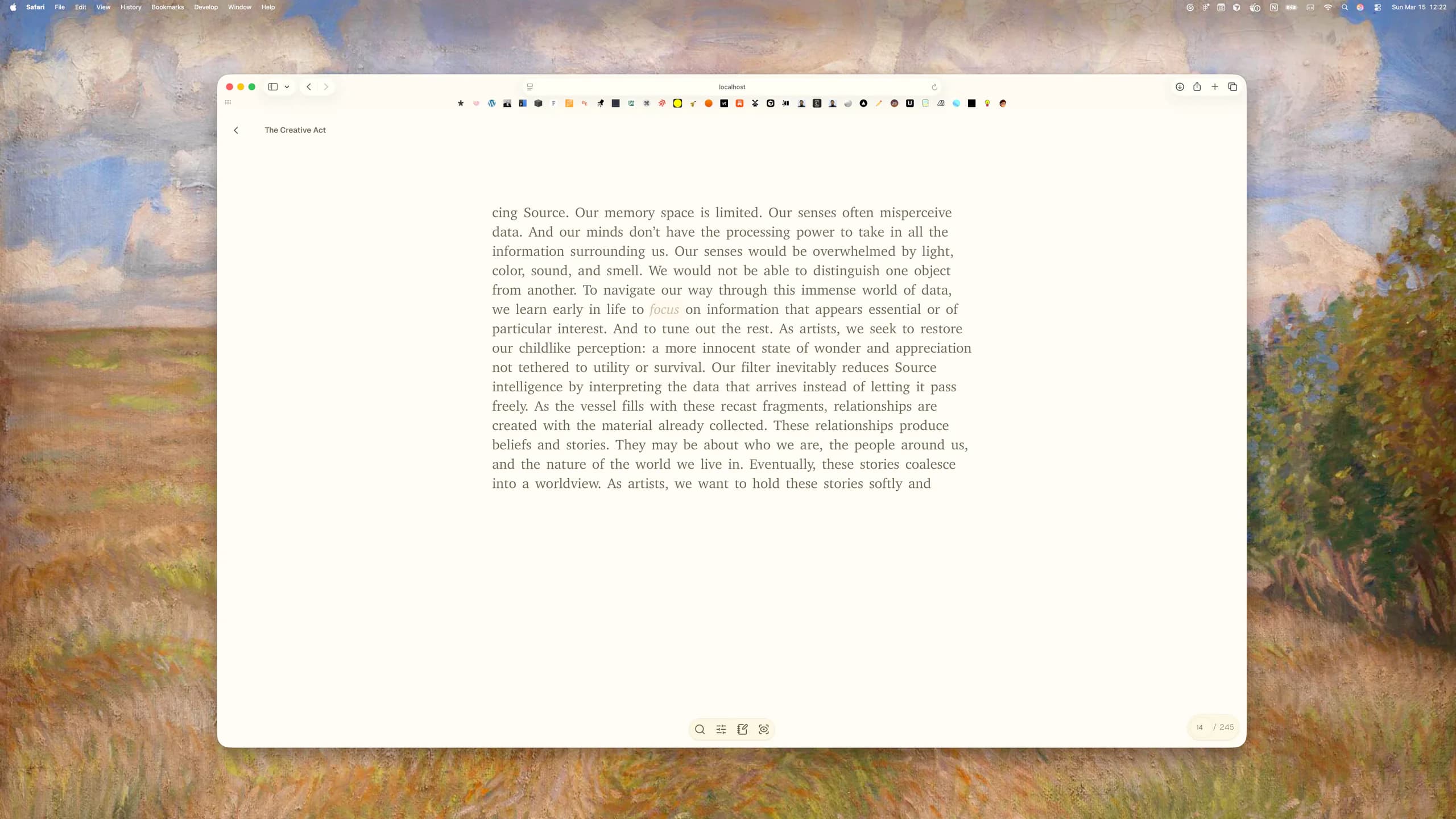
The action bar provides quick access to core actions and contextual information.
Note taking
Embedded note-taking keeps reflections next to the text, encouraging active reading. Notes are lightweight and contextual to avoid cognitive friction in the moment.
Focused text scrolling
Only a few lines are shown at a time to reduce distraction. Trade-off accepted: less overview for stronger immersion — a deliberate decision to protect the reader’s working memory and sustain attention.
Dictionary
Click words for definitions, examples, and synonyms inline. The rationale: inline lookups preserve continuity and reduce costly context switches that interrupt comprehension.
Night mode
System-aware night mode uses warmer tones and reduces contrast to lower visual strain and cognitive fatigue during late-night reading sessions.
Bookmarked words
Readers collect and revisit personally meaningful terms, creating an evolving vocabulary. This turns incidental lookups into a scaffolded learning artifact over time.
Mind map
Visualizing notes as connected ideas scaffolds insight and helps readers see relationships across texts — a design choice aimed at externalizing thinking rather than forcing internal memory work.
Icons with labels reduce cognitive load
Combining icons and labels supports recognition and reduces memorization. This is especially important in growing toolsets where users benefit from visual anchors rather than pure recall.
Tech stack
Built with TypeScript, Next.js, PostgreSQL, OpenAI (ChatGPT-4.5), Xenova/t5-base, Tailwind CSS, Prisma, deployed on Vercel — chosen for a balance of developer ergonomics, performance, and reliable model inference at scale.
Feature-driven structure
Organized by feature folders (components, hooks, styles, tests) following the Next.js app directory. This reduces cognitive overhead for contributors and makes it easier to reason about ownership and scale as the product grows.
Side drawer component
A reusable, configurable side drawer standardizes cross-feature interactions. It enforces consistent affordances and simplifies future expansions without UI debt.
Data structures
Cleaning malformed JSON and normalizing schema was essential — unreliable model outputs directly undermine trust. Robust error handling preserves continuity and a smooth learning experience.
Formatting academic text
Heuristics (e.g., bolding uppercase headings) improve initial readability. Future work includes smarter layout recognition to better preserve rhetorical flow and whitespace for dense academic formats.
Pagination for large documents
Word-by-word rendering proved inefficient; pagination and smooth transitions create a natural reading rhythm and improve performance for long texts.
Reflection
Prompt-first interfaces place cognitive burden on users and break flow. We shifted to a context-first model: interface cues, preloaded context, and embedded guidance that scaffold better questions and deeper understanding without asking readers to become expert prompters. This preserves trust and keeps attention focused on meaning-making rather than system hacking.
Written in collaboration with ChatGPT-4.5